Calling and Debugging Lua Scripts In Game
Install a Lua Script Development IDE
Section titled “Install a Lua Script Development IDE”Developers can use any suitable tool to write Lua scripts. VSCode plus the EmmyLua plugin is recommended for editing Lua scripts, with support for breakpoints, variable watches, and related debugging features.
- Install VSCode: https://code.visualstudio.com/
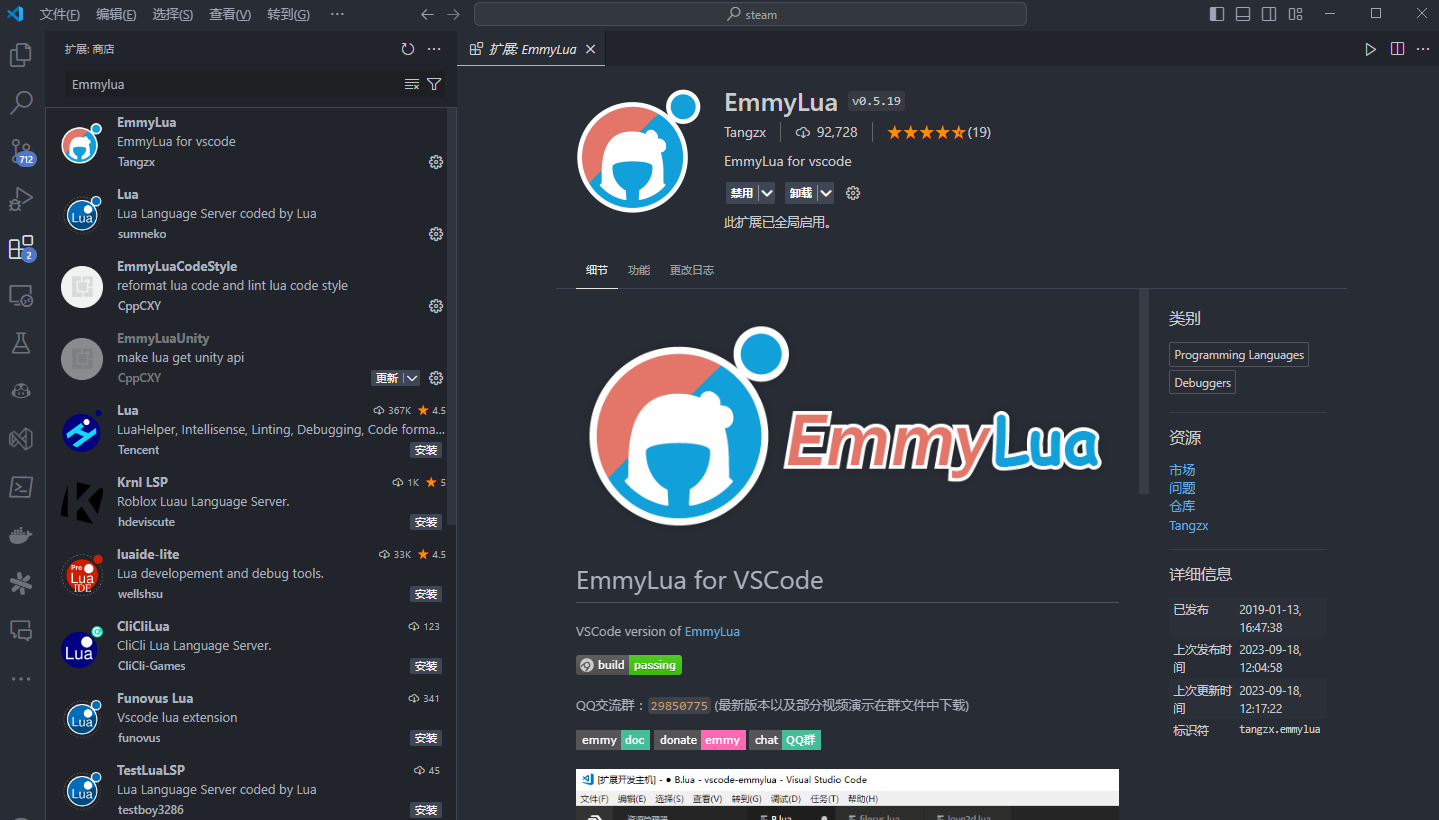
- Search for and install EmmyLua in the VSCode extension panel.
- xLua Lua files use the
.lua.txtextension, so VSCode does not recognize them as Lua files by default. Add a settings entry to complete the mapping.
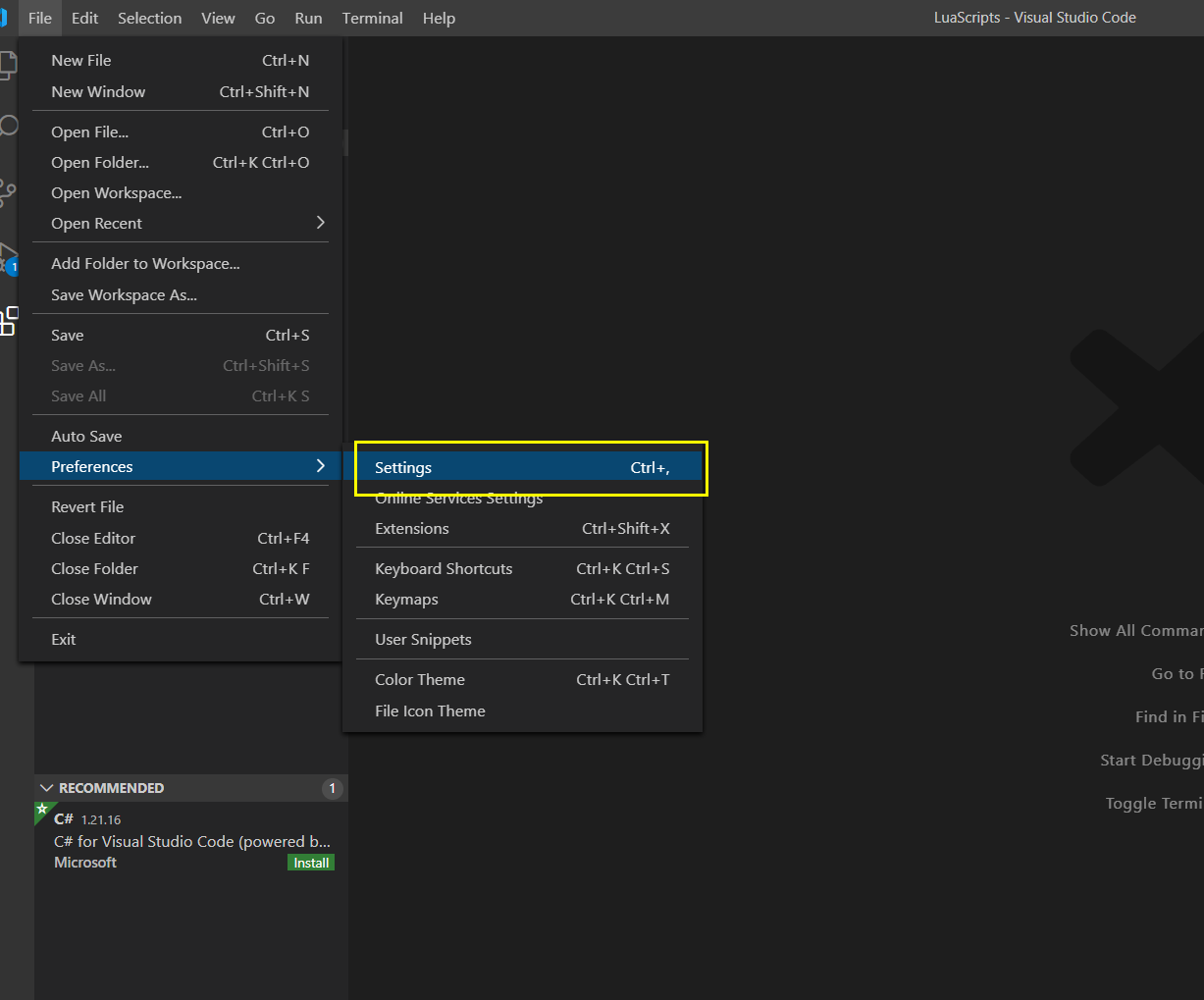
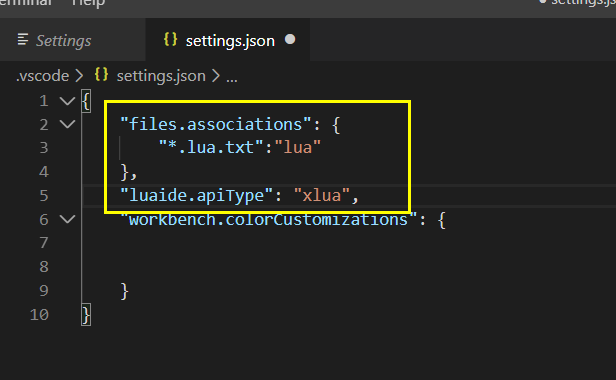
- Open the custom settings JSON file and add:
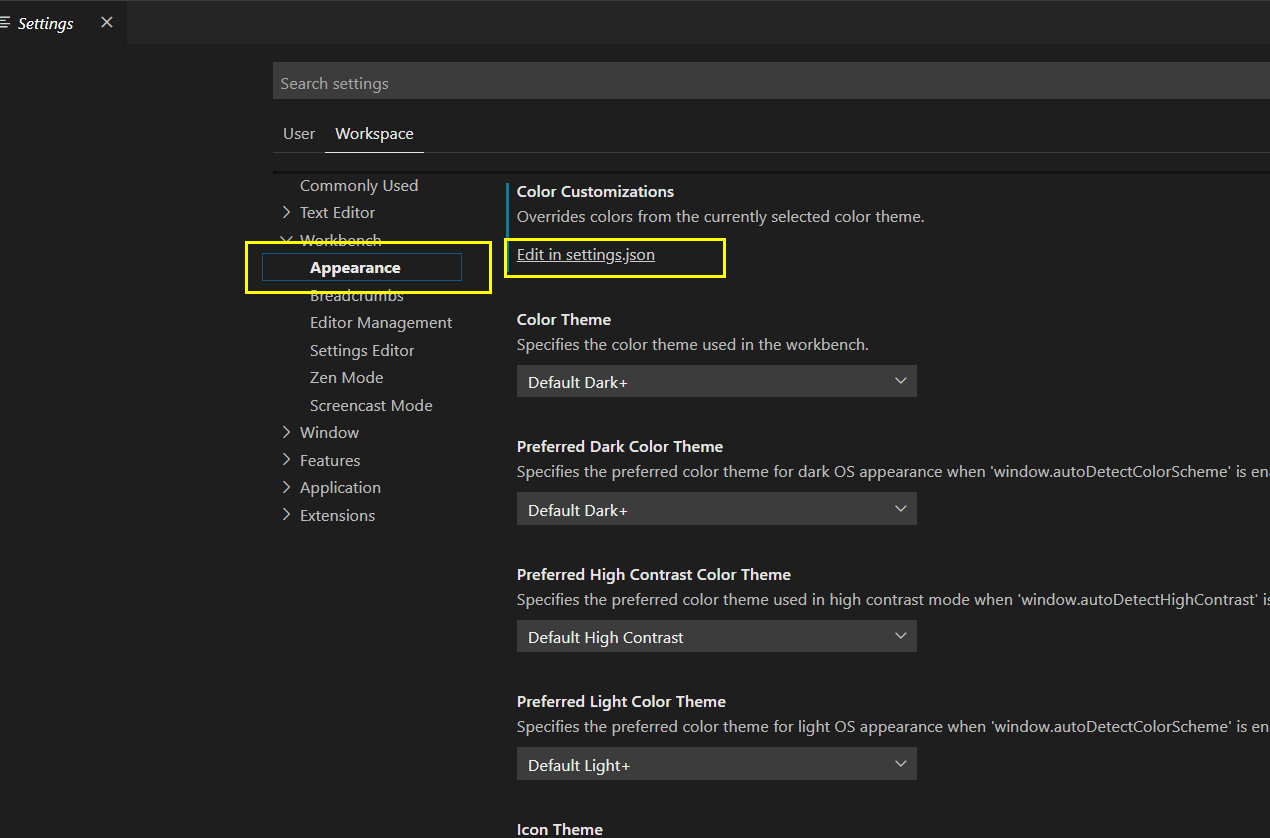
{ "files.associations": { "*.lua.txt":"lua" }, "luaide.apiType": "xlua", }When choosing the settings file, select workspace settings rather than user settings. After selection, a .vscode folder is created under the project root with a settings.json file inside. If .lua.txt files show Lua syntax highlighting, the configuration is working.
Running and Debugging Scripts in a MOD
Section titled “Running and Debugging Scripts in a MOD”Lua script code in game must ultimately be mapped to the resource directory Asset\BuildSource\LuaScripts\. At runtime, use RUN_SCRIPT or RUN_SCRIPT_FUNC to call a script or a function inside a script.
Example:
RUN_SCRIPT_FUNC*test_script#TestFunc1- To make debugging work correctly, VSCode must open the project as a workspace.
From the top VSCode menu, choose File -> Add Folder to Workspace, or right-click an empty area in the project directory and open it with VSCode. Open the whole project folder or the directory containing LuaScripts in VSCode.
After opening, save the workspace. From the top VSCode menu, choose File -> Save Workspace As and save the workspace to a file. VSCode should then show:

- Start breakpoints.
- Press F5, or click Run -> Start Debugging from the top VSCode menu.
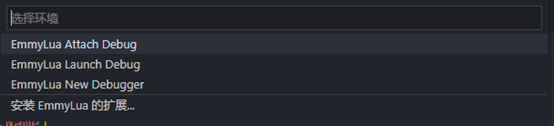
- Select
EmmyLua Attach Debugin the following window.
- Attach to the Sands of Salzaar game process
DesertLegend.exe.

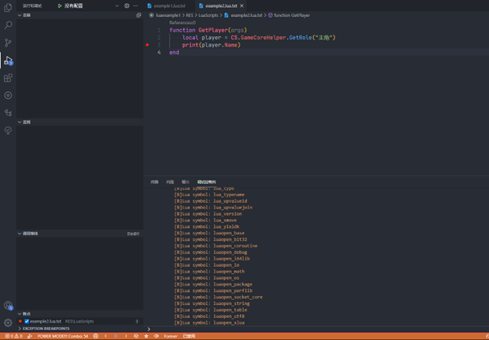
After attachment succeeds, the left side of VSCode switches to the debug panel and the bottom bar turns orange, indicating Debug mode.
Mount Lua Logic with the Plugin Settings Table
Section titled “Mount Lua Logic with the Plugin Settings Table”When custom Lua logic needs to be mounted into the game, use the plugin settings table. After specifying the logic to mount and binding the target function, the game automatically runs the mounted logic when the corresponding logic point executes.
This is the recommended way to add Lua logic and reduce Lua script conflicts.
Available Lua mount points in the plugin settings table:
| Type | Target Field | Target Value | Function Example | Description |
|---|---|---|---|---|
| ADD | on_game_start | ScriptName#FunctionName | function onGameStart() — operations when entering the game end | Runs after entering the game or loading a game. |
| ADD | get_lua_intAD | ScriptName#FunctionName | function GetLuaIntVal(valKey, contextArgVal) if string.find(valKey,‘test=’) ~= nil then local key = string.sub(valKey, 6) return tonumber(key) elseif valKey == “rand100” then return math.random(1, 100) end return 0 end | Implements custom integer variable queries through Lua, corresponding to query directive [$lua_int:KEY$].valKey: string, the KEY passed by the directive.contextArgVal: RuntimeArgVals, the current script environment parameters.Returning 0 means no result, so other Lua query mount functions continue to be called until a valid result is obtained. Returning a non-zero value ends the query immediately and returns that value as the query result. |
| ADD | get_lua_str | ScriptName#FunctionName | function GetLuaStringVal(valKey, contextArgVal) if valKey == “test” then return “ok” end return "" end | Implements custom string variable queries through Lua, corresponding to query directive [$lua_str:KEY$].valKey: string, the KEY passed by the directive.contextArgVal: RuntimeArgVals, the current script environment parameters.Returning nil or an empty string means no result, so other Lua query mount functions continue to be called until a valid result is obtained. Returning a non-empty string ends the query immediately and returns that value as the query result. |
| ADD | game_hour_logics | ScriptName#FunctionName | function OnGameHourLogic(curDay, curH) if curH == 7 then — check party member favor at a fixed time each day PlayerPartyMemberLeaveCheck(curDay); elseif curH == 9 then — iterate custom faction logic CampDailyUpdateLogic(); end end | Logic executed each time one unit of in-game time passes. One day contains 12 units.curDay: int, current in-game day.curHour: int, current unit of the in-game day, with 12 units per day.Avoid concentrating too much logic in this interface; distribute logic where possible to reduce stutter. |
| ADD | camp_daily_logics | ScriptName#FunctionName | function OnCampDailyLogic(tagCamp, curDay) — run faction logic checks end | Daily in-game faction logic.tagCamp: HanFramework.GameCampRtData, the faction currently being checked.curDay: int, current in-game day.Only active factions participating in the game struggle execute faction logic. |
Overriding Core Game Logic Scripts
Section titled “Overriding Core Game Logic Scripts”Some core game logic is implemented in Lua scripts. MOD creators can override the corresponding scripts to adjust diplomacy, internal affairs, favor, and similar logic.
The main built-in game logic interface code is in the Lua script mapped to Asset\BuildSource\LuaScripts\GameLogics.lua.txt. This file can be found under ModSamples\LuaScripts in the game root directory. Use the MOD override function to map that path and replace the specified Lua script.
Main code interfaces in GameLogics.lua.txt:
| Interface Method | Purpose | Parameters |
|---|---|---|
| OnGameStart() | Called every time the game is entered, including after loading a game. | No parameters. |
| GetLuaStringVal(valKey, contextArgVal) | Interface for the [$lua_str:KEY$] query directive. | valKey: query field KEY.contextArgVal: environment variable parameters when the query directive is called.Return value: query result string. |
| GetLuaIntVal(valKey, contextArgVal) | Interface for the [$lua_int:KEY$] query directive. | valKey: query field KEY.contextArgVal: environment variable parameters when the query directive is called.Return value: query result integer. |
| SetRoleRep(opRole, targetType, tagID, opVal, isAdd, isNotify, isChainedMode) | Interface for changing a role’s reputation in game. | opRole: role object performing the operation.targetType: target type, 0 faction, 1 role, 2 place.tagID: target object ID.opVal: operation value.isAdd: operation mode. When true, add/subtract from the original value; otherwise set directly to the target value.isNotify: whether to show a message when the main character is involved.isChainedMode: whether to use chained operations, changing related favor objects.Return value: integer query result. |
| GivePresentLogic(contextArgVal) | Logic interface for increasing NPC favor by giving gifts. | contextArgVal: environment variable parameters when this logic is called.Return value: none. |
| OnCampDailyLogic(tagCamp, curDay) | Daily faction logic. The game calls this logic interface for all factions each day. | No parameters or return value. |
| OnAIDecideDipEvent(execCamp, dipInfo) | AI faction decision logic for diplomacy behavior. Player-side diplomacy behavior is decided by handling dip_event trigger events. | execCamp: faction object executing the diplomacy event.dipInfo: detailed info for the diplomacy event, type DiplomaticEventInfo, with structure:- public GameCampRtData fromCamp; - public GameCampRtData execCamp; - public int dipType; - public string tagRoleID; - public string argsVal; - public float resultRatio; - public bool isDecided; Return value: none. |
| OnDipEventCallback(dipResult, dipInfo) | Interface for handling the result of diplomacy events executed by all factions. | dipResult: diplomacy event result, true means agree, false means refuse.dipInfo: same as above.Return value: none. |
| SetCampRl(campID1, campID2, rlState, fvOpMode, fvOpVal, isNotify) | Interface executed when changing diplomacy relations between factions in game. | campID1: diplomacy relation object A.campID2: diplomacy relation object B.rlState: target diplomatic state, -1 no change, 0 neutral, 1 hostile, 2 allied.fvOpMode: diplomacy favor operation mode, 0 no change, 1 add, 2 set to target value.fvOpVal: diplomacy favor operation value.isNotify: whether to show a message when the player is involved.Return value: integer query result. |