Overview
1. What Can I Do with MODs?
Section titled “1. What Can I Do with MODs?”Sands of Salzaar supports MODs, and the game framework provides extensibility. With the development tools provided by the game, you can create content such as:
-
Add new playable content to the existing Sands of Salzaar game, including stories, factions, heroes, music, units, map elements, and art.
-
Adjust values, including combat, economy, starting setup, world rules, and more.
-
Replace game assets, such as changing character appearances or importing new units, heroes, or boss models.
-
Use the Sands of Salzaar framework to create a new story campaign, such as a campaign based on the Three Kingdoms period.
-
Create plugins that can be mounted onto campaigns, such as hero packs, story packs, equipment packs, expanded quests, expanded world rules, and new systems.
-
Explore more possibilities supported by the framework.
After finishing a MOD, you can upload it to the Steam Workshop and share it with friends or players around the world. You can also distribute the MOD files directly. Anyone with Sands of Salzaar installed can experience the content you create.
In short, you can use your imagination to create many kinds of experiences within the framework and share them with others.
2. Difference Between Story Campaigns and Plugins
Section titled “2. Difference Between Story Campaigns and Plugins”The game provides two MOD forms: story campaigns and plugins.
A story campaign is a concrete playable game package that should be able to run independently as a complete game experience. The base Sands of Salzaar game itself is a campaign. A plugin is an expansion package that acts on a campaign or a shared campaign, such as a hero pack, quest enhancement, item expansion, unit pack, skill pack, or specific profession.
3. MOD Structure and Basic Concepts
Section titled “3. MOD Structure and Basic Concepts”1. One Campaign and Multiple Plugins
The game must have exactly one story campaign loaded, and it can load multiple plugins at the same time. Plugins cannot run independently; they are additions layered on top of a story campaign.
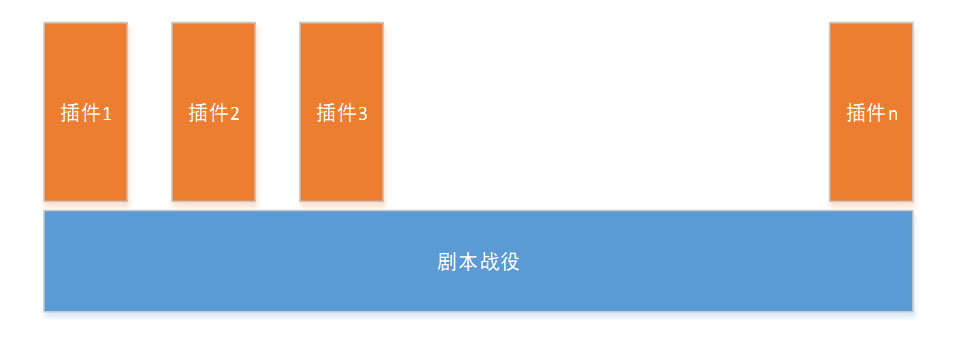
Relationship between story campaigns and plugins
2. MOD Loading Order
Plugins have a loading order. The game first loads the story campaign, then loads plugins in the configured order. If the same element is defined more than once, the later plugin overrides the earlier one.
When designing a MOD, you can define its dependencies, such as which MOD must be loaded before it. This lets the game load MODs in the correct order at startup even if the player sets the wrong order in the configuration screen.
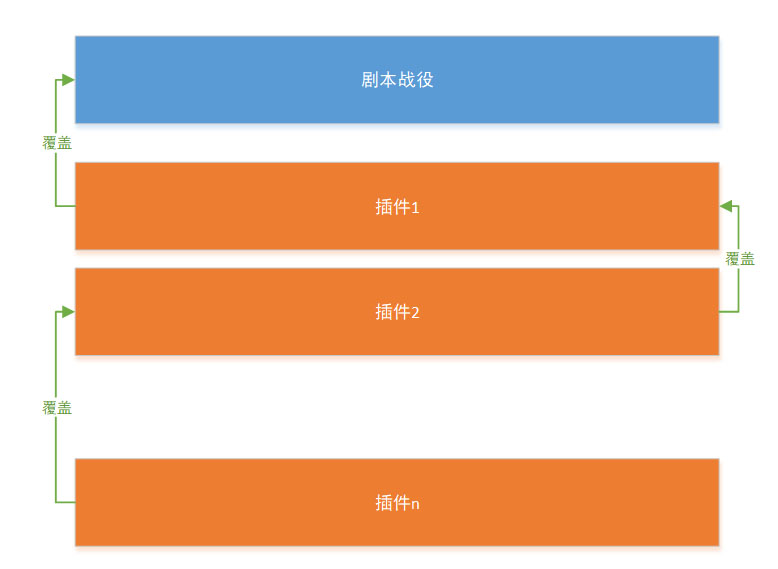
MOD loading order diagram
4. Cross-Platform and Programmable Extensions
Section titled “4. Cross-Platform and Programmable Extensions”The game is released in IL2CPP format. This means C# decompilation tools such as dnSpy cannot be used to inspect code or inject hook-style code to implement advanced MOD behavior.
Because the game supports multiple platforms, MOD content should also remain as cross-platform as possible. MOD creators are given a unified development environment and syntax rules, and MODs should be written according to those formats.
In the game config tables, the game provides logic syntax that works like programming but is simpler to read and use.
The game supports extension methods such as story commands, condition expressions, Lua scripts, and resource overrides. MOD authors can choose the appropriate method based on the content they are creating.
5. Getting Help
Section titled “5. Getting Help”You can report MOD development issues in the Steam discussions or official community channels.
Including the tag [MOD Development] in the title helps other developers and official staff identify the issue type.